


Day One Diary: Daily Journal
4.62.02K Reviews
App Specs
- Version
- 2026.17
- Updated On
- License
- Free
- Downloads
- 1,000,000+
- Developer
- Automattic, Inc
- Categories
- Lifestyle
- Platform
- Android
Screenshots
 Analysis by AppCompare
Sharing a phone or tablet around the house makes the idea of a diary app feel a little different: the important question is not only what you can record, but who can see it. I’d treat Day One Diary as a personal journal rather than a shared family notebook. It suits one person who wants a private place for memories, plans, and passing thoughts, but it is not a household coordination tool.
One device, separate personal space
In a realistic evening routine, I might use the household tablet to check a recipe, then open my own journal to note what worked or save a photo from the day. That is a useful personal workflow, but it depends on keeping my account and device access to myself. I would not hand the tablet to another family member while an entry is open, or use one shared account for several people’s private writing.
The distinction matters because a journal can hold details that are harmless in isolation but sensitive in combination: a location, a family photo, or an honest account of a difficult conversation. Before adding those details, I’d think about who can unlock the device and whether anyone else uses the same account. A passcode or biometric lock can help protect access, but no lock makes a shared account a good substitute for separate personal boundaries.
Keeping journaling separate from coordination
For household logistics, I would keep using a shared calendar, notes list, or messaging thread. Those tools make it easier for several people to see changes and act on them. A diary has a different job: it is where I can privately reflect on the day, save context around a photo, or record how a family event felt to me. Trying to make it serve as both a private journal and a group planner would blur those purposes.
One practical approach is to record the personal side of a busy day in Day One, then put only the actionable detail somewhere shared. For example, I might write privately about a stressful appointment while adding the next appointment time to the family calendar. That separation keeps the journal expressive without making another person responsible for checking it.
Who will feel at home here
I’d recommend the app to adults and older teens who want a consistent personal record and enjoy adding media or revisiting entries later. Automattic, Inc develops it, and its Lifestyle category positioning fits that reflective, everyday use. It is free to start, rated for Everyone, and has a 4.7 average from around 25,000 ratings, with over 1 million installs. The current version is 2026.4, and it requires OS 9 or later.
Its scale may reassure someone choosing an established journal app, but popularity is not a reason to put family members’ entries into one account. Younger users should have an age-appropriate conversation with a trusted adult about what they record and who can access the device. I would not assume that an Everyone age label means every household will want to use the app in the same way, or that the app provides family controls.
Worth Reading Before You Choose

EA SPORTS FC Mobile 26 Is a Bigger Football Game, but It Takes Time

Flipboard Shows What News Apps Must Do Beyond the Feed

Switching to Android Auto Means Rethinking Your Driving Routine

Google Calendar Makes a Crowded Week Easier to Manage

Ludo King Makes the Most of the Minutes Between Plans

Baby Panda World Brings Quick Play to Modern Phones, but Its Game Library Feels Busy
Where I’d draw the line
If your main goal is to coordinate chores, share a running grocery list, or let several people contribute to one record, I’d choose a tool designed around collaboration instead. If you mainly want a quick, disposable note, your phone’s built-in notes app may be simpler. Day One makes more sense when you want entries to accumulate into a personal timeline and are willing to maintain that habit.
There is also a cost decision to make if you grow into the app. The download is free, while in-app purchases range from $2.99 to $99.99 per item. I’d begin with the free experience and decide only after identifying a specific limitation that an upgrade would solve. That avoids paying for capabilities you may never use, especially if your actual need is just occasional writing.
First Impressions
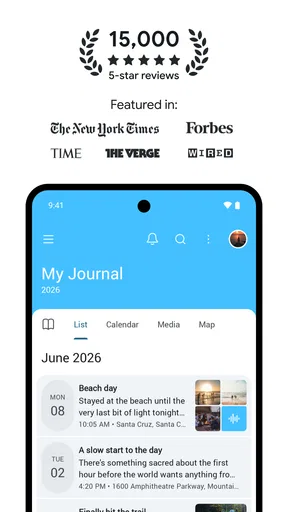
When I first downloaded the Day One Diary, the sleek and minimalist design immediately stood out. It's like walking into a super chic coffee shop that screams, “Come on in, make yourself at home.” The interface is clean and intuitive, making it a breeze to navigate. Even if you’re not a tech whiz, you’ll find yourself feeling right at home.
Features That Make You Go "Wow!"
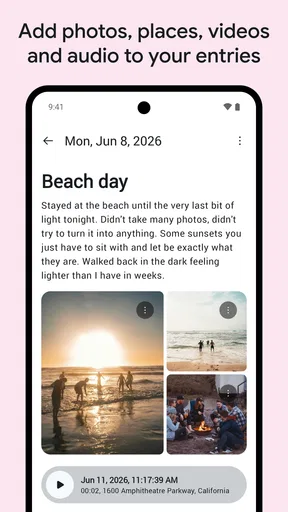
Now, let’s dive into the nitty-gritty. The app offers a plethora of features that make journaling not just easy, but genuinely enjoyable. First off, you can add photos, which is a game-changer. I mean, a picture is worth a thousand words, right? Whether it’s a snapshot of your morning coffee or a breathtaking sunset, you can capture the moment and let your words flow around it.
The app also supports audio recordings. Imagine being able to record a quick voice note when typing just doesn’t cut it. It’s perfect for those days when you’re on the go or when your fingers just can’t keep up with your thoughts.
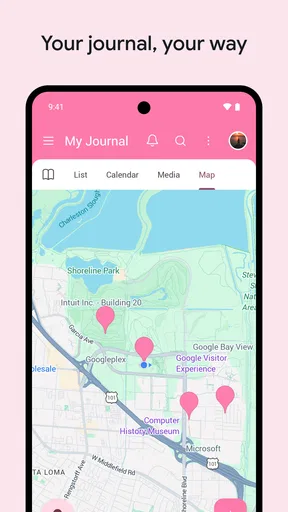
Another feature worth mentioning is the location tagging. It adds a whole new dimension to your entries. Years down the line, you can look back and remember exactly where you were when you wrote that heartfelt note.
Security and Privacy
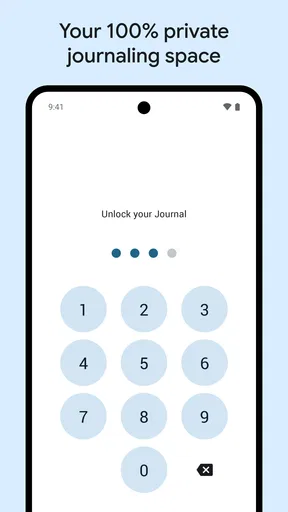
We all know how important privacy is, especially when it comes to journaling. The app doesn’t disappoint in this department. With end-to-end encryption, your entries are locked away tighter than Fort Knox. Plus, you can set a passcode and use Face ID or Touch ID for an extra layer of security. It’s like having a digital diary with a padlock.
Sync Across Devices
If you’re anything like me, you’ve got multiple devices, and keeping them in sync can be a headache. But not with Day One. The app effortlessly syncs across all your devices. Start an entry on your phone and finish it on your tablet – it’s that seamless. Plus, with cloud backup, you’ll never have to worry about losing your precious thoughts.
Customization and Personalization
One of the things I love is how personalized you can make your journaling experience. Choose from a variety of themes and fonts to match your mood or aesthetic. It’s these little touches that make journaling feel less like a chore and more like a personal ritual.
A Few Quirks
Of course, no app is perfect. While Day One Diary is pretty close, there are a few hiccups. Sometimes, the app can lag when loading large entries filled with media. Also, while the free version offers plenty of features, some of the more advanced options are locked behind a subscription. But hey, if you’re serious about journaling, it might be worth the investment.
For a more useful routine, I’d avoid trying to make every entry polished. A short note and one photo can be enough to preserve a day, while an occasional longer entry can capture the context that a gallery alone loses. I’d also use voice recording selectively: it is convenient when walking or when a thought arrives quickly, but a recording may be less practical to search or skim than a few typed lines. The best format is the one I’ll actually return to.
Location tags are most valuable when they add meaning, not merely because the option exists. I’d keep them for trips, unfamiliar places, or milestones I may want to place on a map in memory, and leave them out of entries where a precise location adds little. That small choice can make a personal archive more useful while avoiding unnecessary detail.
A habit that survives busy days
The biggest challenge with journaling is usually not finding an app; it is remembering to write. I’d attach the habit to something already dependable, such as winding down after dinner or reviewing a photo at the end of the day. If I miss a day, I would not try to reconstruct every hour. A sentence about what stands out is often a better way back in than treating the journal like a streak to protect.
For travel, I’d use the app as a record of impressions rather than a substitute for a trip planner. A photo, a short voice note, and a few lines about what surprised me can bring back more than a bare list of places. At home, the same approach works for gradual changes: a garden, a child’s new interest, or a renovation. The journal becomes more valuable when entries preserve why a moment mattered, not just what happened.
Choosing the right kind of journal
Compared with a paper notebook, a digital journal is easier to pair with photos, audio, and location context, and it can travel with the phone already in my pocket. Paper still has an appeal if I want a screen-free ritual, unrestricted page layout, or something that never depends on a device. Compared with a basic notes app, Day One is more deliberately shaped around keeping a personal record over time; a notes app is often quicker for temporary reminders and lists.
That distinction is useful when deciding what to keep where. I would not put passwords, urgent reminders, or shared household tasks into a reflective journal just because it is convenient to open. Nor would I expect a journal entry to become a reliable family handoff. Keeping those records in tools built for their purpose reduces the chance that a private thought gets mixed up with a practical instruction.
Making the archive easier to revisit
One useful habit is to give an entry a clear first sentence: the event, place, or feeling I would search for in my memory later. A page that begins with “The train home after the storm” is easier to recognize than a vague opening such as “Today was strange.” I would also add only media that contributes context. A pile of similar images can make an entry heavier to browse without helping me remember it better.
Before relying on any digital journal as the sole home for important memories, I’d learn how its account and backup arrangements work for my own setup and keep device access in mind. Sync is convenient, but it is not the same thing as a household sharing plan or a substitute for sensible account security. This is especially worth thinking through before switching phones or letting someone else use a device that is already signed in.
Small frictions worth weighing
Media-rich entries can take longer to open, so I would not attach a large batch of photos to every ordinary day. A focused selection keeps the journal easier to revisit and avoids turning the writing process into file management. The other possible friction is the temptation to spend time choosing presentation details instead of recording the thought itself. Themes and fonts can make the space feel personal, but I’d settle on a comfortable look and get on with writing.
Someone who wants a completely free, bare-bones text pad may find the purchase options distracting, while a person who values a richer personal archive may see a reason to consider them. I would judge that decision by my own routine rather than by the number of available options: if I rarely add anything beyond a sentence, a simple notes tool may be enough. If I consistently return to photos, recordings, and location-linked memories, a dedicated journal is easier to justify.
A personal record, not a family hub
My household verdict is that Day One works best when each person treats journaling as their own private practice and uses shared tools for shared responsibilities. It can help preserve the small details that make ordinary days memorable, but its value depends on choosing appropriate boundaries and keeping expectations realistic. I would recommend it to someone ready to build a personal archive; I’d steer a family looking for one common diary or task center toward a collaboration-first alternative.
Overall, the app offers a fantastic way to document your life’s journey, whether you’re a seasoned journaler or just getting started. It’s like having a little piece of tranquility in the palm of your hand, ready to embrace your every thought and feeling.
So, if you’re on the hunt for a journaling app that’s both functional and delightful, give Day One Diary a whirl. Who knows? You might just find yourself addicted to the art of journaling.
Pros
- Intuitive interface for easy journaling.
- Syncs across devices seamlessly.
- Offers robust security features.
- Rich text formatting available.
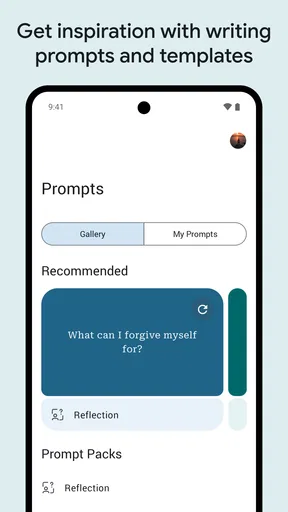
- Daily prompts for inspiration.
Cons
- Subscription required for full features.
- Limited export options.
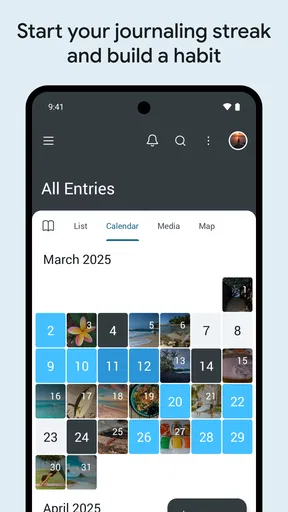
- No calendar view for entries.
- Can be slow with large entries.
- No audio recording feature.
FAQs for Day One Diary: Daily Journal
Is Day One Diary available on both Android and iOS?
Yes, Day One Diary is available for download on both Android and iOS platforms. Users can find it on the Google Play Store for Android devices and the App Store for iOS devices. This ensures a seamless journaling experience across different mobile operating systems.
Does Day One Diary offer cloud syncing?
Day One Diary provides cloud syncing to ensure your entries are backed up and accessible across multiple devices. This feature allows you to start a journal entry on one device and continue on another without losing any information, making it convenient for users with multiple gadgets.
Are there privacy features in Day One Diary?
Yes, Day One Diary emphasizes user privacy. It offers features such as password protection and biometric lock options, like fingerprint or face recognition, to keep your entries secure. These measures help ensure that your personal thoughts and memories remain private and protected.
Can I add multimedia elements to my entries in Day One Diary?
Absolutely, Day One Diary allows you to enrich your journal entries with multimedia elements. Users can easily add photos, audio recordings, and even videos to their entries, creating a more vivid and engaging journaling experience that captures memories in various forms.
Is there a cost associated with using Day One Diary?
Day One Diary offers a free version with basic features, but also provides a premium subscription for users who want access to advanced features. These may include additional storage, premium themes, and other enhancements that improve the overall journaling experience. Pricing details can be found on the app’s official download page.


